General
In the previous notebook, we created a document base and tested it with a set of questions. In this notebook, we will explore two strategies to deploy a RAG system. Specifically, we will evaluate a workflow-based approach and an agentic setup.
These correspond to steps 4 and 5 described in the previous notebook.
For this tutorial, we add two additional collections to our vectorized data. One collection contains Linux information, and the other contains information about Slurm. This slightly complicates the retrieval step: what happens when we receive a query? We could launch a semantic search over all our data and keep the top three relevant documents from all the collections, or we could:
Create a workflow that routes a question through a specific retriever;
Create an agent that does this automatically.
Imports
import base64
from IPython.display import Image, display

import os
import re
import ast
from datetime import datetime
from dotenv import load_dotenv
from typing import List, Optional
from enum import Enum
from pydantic import BaseModel
import random

from langchain_openai import ChatOpenAI
from langchain_chroma.vectorstores import Chroma
from langchain_huggingface import HuggingFaceEmbeddings
from langchain.retrievers.document_compressors import CrossEncoderReranker
from langchain_community.cross_encoders import HuggingFaceCrossEncoder
from langchain.retrievers import ContextualCompressionRetriever
from langchain_core.documents import Document
from langchain_core.tools import tool
from langgraph.prebuilt import create_react_agent
Env config
t0 = datetime.now()
date = re.sub(r"[ :-]", "_", str(t0)[:19])
print(f"Last execution {t0}")

load_dotenv()

# Models
EMBEDDER = "BAAI/bge-m3"
RERANKER = "BAAI/bge-reranker-v2-m3"
LLM = "mistralai/Mistral-Small-3.1-24B-Instruct-2503"

# Endpoints
VLLM_OPENAI_ENDPOINT = os.environ["VLLM_OPENAI_ENDPOINT"]
VLLM_KEY = os.environ["VLLM_KEY"]

# Paths
PROMPT_PATH = "../data/prompts"
CHROMA_PATH = "../data/output/chunking/chroma"

llm = ChatOpenAI(base_url=VLLM_OPENAI_ENDPOINT, api_key=VLLM_KEY, model=LLM, temperature=0, max_completion_tokens=3000)

# Use GPU 3 for this notebook. GPUs 0 and 1 are used to load the llm
os.environ["CUDA_VISIBLE_DEVICES"] = "2"
Last execution 2025-07-28 16:51:48.413683
# Util function to plot mermaid graphs
def mm(graph):
    graphbytes = graph.encode("utf8")
    base64_bytes = base64.urlsafe_b64encode(graphbytes)
    base64_string = base64_bytes.decode("ascii")
    display(Image(url="https://mermaid.ink/img/" + base64_string))
The collections
# This is basically the class we implemented in the previous notebook, except for the fact that we removed the llm generation call
class SemanticRetriever():
    def __init__(self, top_k:int, collection_name:str, chroma_path:str, embedder_name:str, reranker_name:str):
        self.reranker_name = reranker_name
        lc_embedder = HuggingFaceEmbeddings(model_name = embedder_name)
        vector_store = Chroma(collection_name = collection_name, embedding_function = lc_embedder, persist_directory = chroma_path)
        self.retriever = vector_store.as_retriever(search_kwargs = {"k": 20 if self.reranker_name else 3})
        if self.reranker_name:
            reranker = HuggingFaceCrossEncoder(model_name=reranker_name)
            compressor = CrossEncoderReranker(model=reranker, top_n=top_k)

            self.compression_retriever = ContextualCompressionRetriever(base_compressor=compressor, base_retriever=self.retriever)

    def retrieve(self, query:str):
        if self.reranker_name:
            retrieved_chunks:List[Document] = self.compression_retriever.invoke(query)
        else:
            retrieved_chunks:List[Document] = self.retriever.invoke(query)

        resources = "[RETRIEVED_RESOURCES]:\n\n"
        for chunk in retrieved_chunks:
            page_content = chunk.page_content
            doc_name = chunk.metadata["doc_name"]
            resources += "[DOCUMENT_TITLE]: " + doc_name + "\n[DOCUMENT_CONTENT]: " + page_content + "\n\n"
        return resources
class SlurmDocumentationRetriever():
    def __init__(self):
        self.slurm_docs = [Document(page_content="SLURM Overview: SLURM (Simple Linux Utility for Resource Management) is an open-source workload manager used for scheduling and managing jobs on HPC clusters, handling job queues, and allocating resources on compute nodes."),
                           Document(page_content="SLURM Architecture: Understand how SLURM components interact, including the controller daemon (slurmctld), compute node daemons (slurmd), and optional database daemon (slurmdbd) for accounting."),
                           Document(page_content="Comparison with Other Workload Managers: Compare SLURM with PBS, LSF, and other schedulers to understand differences in syntax, features, and usage within HPC environments."),
                           Document(page_content="SLURM Key Components: Learn about slurmctld for managing jobs, slurmd for executing jobs on compute nodes, slurmdbd for accounting, and configuration files like slurm.conf, cgroup.conf, and gres.conf for resource management."),
                           Document(page_content="Basic SLURM User Commands: Commands like sbatch (submit jobs), squeue (check job queue), scontrol show job (inspect job details), scancel (cancel jobs), and srun or salloc (interactive job execution)."),
                           Document(page_content="SLURM Job Scripts: Structure and syntax for writing SLURM batch scripts, including SBATCH directives for setting job names, outputs, errors, wall time, partitions, node and CPU requests, memory, and GPU allocations."),
                           Document(page_content="Resource Management: Learn about partitions and priorities in SLURM, scheduling policies like backfill and fair-share, node features, GPU scheduling, and requesting memory and CPU resources accurately."),
                           Document(page_content="Monitoring and Debugging in SLURM: Tools like sinfo (cluster state), squeue and scontrol (job monitoring), sacct and sreport (accounting), seff (job efficiency check), and methods for debugging stuck or failed jobs."),
                           Document(page_content="Advanced SLURM Usage: Using job arrays for batch submission, managing job dependencies, checkpointing, requeueing failed jobs, heterogeneous job scheduling, and requesting advanced resources like licenses or specialized hardware."),
                           Document(page_content="SLURM Accounting and Reporting: Setting up slurmdbd, configuring accounting_storage, managing users and accounts with sacctmgr, using QoS for prioritization, and generating usage and efficiency reports using sreport."),
                           Document(page_content="SLURM Configuration and Administration: Writing and maintaining slurm.conf, configuring partitions and node states (drain, down, idle), managing fair-share policies, and using cgroup integration for resource control."),
                           Document(page_content="Integrations and Extensions: Integration of SLURM with MPI for parallel workloads, using Singularity or Apptainer containers with SLURM jobs, profiling jobs with sstat and sacct, and integrating with monitoring tools like Prometheus and Grafana."),
                           Document(page_content="SLURM REST API: Learn about slurmrestd for exposing SLURM capabilities over HTTP/REST for programmatic management and monitoring of SLURM clusters."),
                           Document(page_content="Security and Policies in SLURM: Managing user authentication, permission controls, node isolation, job sandboxing, enforcing resource limits, and setting job timeout policies within a SLURM-managed HPC cluster."),
                           Document(page_content="Best Practices for SLURM: Writing efficient and clear job scripts, effectively using job arrays for scalable workloads, managing GPU and node usage for efficiency, profiling and optimizing SLURM jobs, and systematic debugging of issues.")
                          ]

    def retrieve(self, query:str) -> str:
        retrieved_chunks:List[Document] = [random.choice(self.slurm_docs)]

        resources = "[RETRIEVED_RESOURCES]:\n\n"
        for chunk in retrieved_chunks:
            page_content = chunk.page_content
            resources += "[DOCUMENT_CONTENT]: " + page_content + "\n\n"

        return resources
class LinuxDocumentationRetriever():
    def __init__(self):
        self.linux_doc = [Document(page_content="Linux Overview: Linux is an open-source, Unix-like operating system kernel used for managing hardware resources and providing essential services to run applications on servers, desktops, and embedded systems."),
                          Document(page_content="Linux Distributions: Learn about different Linux distributions (distros) such as Ubuntu, CentOS, Debian, Fedora, and Arch, which package the Linux kernel with user-space utilities and package managers for different use cases."),
                          Document(page_content="Linux Filesystem Hierarchy: Understand the Linux filesystem structure, including root (/), /home, /etc, /var, /usr, /tmp, and the purpose of each directory in system organization."),
                          Document(page_content="File and Directory Management: Basic file operations using commands like ls, cp, mv, rm, mkdir, rmdir, and advanced file management using find, locate, and file permissions (chmod, chown, chgrp)."),
                          Document(page_content="User and Group Management: Managing users and groups with commands like useradd, userdel, passwd, groupadd, and understanding /etc/passwd, /etc/shadow, and /etc/group files."),
                          Document(page_content="Process Management: Understanding Linux processes, using ps, top, htop, kill, pkill, nice, renice, and background/foreground job control with &, fg, bg, and jobs."),
                          Document(page_content="Package Management: Installing, updating, and removing packages using apt (Debian/Ubuntu), yum/dnf (RHEL/CentOS/Fedora), and pacman (Arch), and building packages from source."),
                          Document(page_content="System Services and Daemons: Managing system services using systemd (systemctl), service, and chkconfig, and understanding how daemons run in the background to provide essential system services."),
                          Document(page_content="Networking Basics: Configuring network interfaces using ip, ifconfig, and nmcli, checking connectivity with ping, traceroute, and managing network services like SSH and firewalls."),
                          Document(page_content="Disk and Filesystem Management: Managing disks and partitions using fdisk, lsblk, blkid, formatting with mkfs, mounting filesystems with mount/umount, and checking disk usage with df and du."),
                          Document(page_content="System Monitoring and Logging: Using monitoring tools like top, htop, iostat, vmstat, free, and inspecting logs in /var/log using tail, less, journalctl, and log rotation."),
                          Document(page_content="Shell Scripting: Writing basic and advanced shell scripts using bash, using variables, loops, conditionals, and creating reusable scripts for automation of system tasks."),
                          Document(page_content="Security and Permissions: Managing file permissions, using sudo for privilege escalation, configuring SSH security, using fail2ban, and keeping the system updated for security patches."),
                          Document(page_content="System Backup and Recovery: Using tar, rsync, and cron for backups, creating disk images, and recovery strategies to restore system states in case of failures."),
                          Document(page_content="Advanced Linux Topics: Kernel modules management, performance tuning, using system calls, cgroups for resource management, and using containers (Docker, Podman) on Linux systems."),
                          Document(page_content="Linux Best Practices: Keeping systems updated, securing SSH access, using least privilege, monitoring system resources regularly, automating tasks with cron, and maintaining clean logs and disk usage.")
                         ]

    def retrieve(self, query:str) -> str:
        retrieved_chunks:List[Document] = [random.choice(self.linux_doc)]

        resources = "[RETRIEVED_RESOURCES]:\n\n"
        for chunk in retrieved_chunks:
            page_content = chunk.page_content
            resources += "[DOCUMENT_CONTENT]: " + page_content + "\n\n"

        return resources
hpc_retriever = SemanticRetriever(top_k = 3, collection_name = "hpc_contextualized_wiki", chroma_path = CHROMA_PATH, embedder_name = EMBEDDER, reranker_name = None)
slurm_retriever = SlurmDocumentationRetriever()
linux_retriever = LinuxDocumentationRetriever()
/leonardo/home/userinternal/rmioli00/git/cinecaxtpc25/session_5/venv/lib/python3.11/site-packages/tqdm/auto.py:21: TqdmWarning: IProgress not found. Please update jupyter and ipywidgets. See https://ipywidgets.readthedocs.io/en/stable/user_install.html
  from .autonotebook import tqdm as notebook_tqdm
Workflow
We can ask the llm what is the most relevant collection given a question. Then, we trigger search into that collection.

We need to constrain the model’s answers to a specified set of categories (e.g., HPC, Slurm, etc.). We can reduce unwanted outputs from the model (e.g., prepending “Absolutely, here is your category”) when returning answers by using guided decoding.
Unlike standard decoding methods such as greedy search, sampling, or beam search, guided decoding incorporates additional rules during generation to influence the model’s output. During token generation, the model’s output logits (the scores before applying softmax) are influenced by masking invalid options. Valid options are specified using Pydantic models, JSON schemas, or similar tools.

Image courtesy of: https://lmsys.org/blog/2024-02-05-compressed-fsm/.
class Collection(str, Enum):
    LINUX = "Linux"
    SLURM = "Slurm"
    HPC = "HPC"
    NA = "None"

class QueryCategory(BaseModel):
    category:Collection

def documentation_router(query:str, llm):
    few_shot_prompt = f"""Given the following query, answer with a category chosen from the following:
- Linux: Use this category if the question is about Linux.
- Slurm: Use this category if the question is a general question about Slurm.
- HPC: Use this category if the question is about Cineca, Leonardo, or is a specific Slurm question about how Slurm is configured on Leonardo.
- None: Use this category if the question is generic and does not fall into any of the previous categories.

Here are some examples:
[QUERY]: How many GPUs does Leonardo have?
[ANSWER]: HPC
[QUERY]: Have you ever read Lord of the Rings?
[ANSWER]: None
[QUERY]: What is Linus Torvalds' favourite distro?
[ANSWER]: Linux
[QUERY]: When was Slurm invented?
[ANSWER]: Slurm

[QUERY]: {query}
[ANSWER]:"
    """
    answer = llm.with_structured_output(QueryCategory).invoke([("system", "Answer accordingly to the user's instructions."),
                           ("user", few_shot_prompt)])

    if answer.category is Collection.LINUX:
        return linux_retriever.retrieve(question)
    elif answer.category is Collection.HPC:
        return hpc_retriever.retrieve(question)
    elif answer.category is Collection.SLURM:
        return slurm_retriever.retrieve(question)
    else:
        return "[RETRIEVED_RESOURCES]: No resources where retrieved for this question."
query_set = ["Tell me something about Linux",
             "Tell me something about Slurm",
             "What's the weather like in Italy?",
             "What are the names of the QOS queues available on the Leonardo supercomputer BOOSTER partition?",
             "What is the scheduler used on leonardo? slurm or pbs?"]

for question in query_set:
    documents = documentation_router(question, llm)
    question = f"[QUESTION]:\n\n{question}\n\n{documents}"
    print(question)
    answer = llm.stream(question)
    print(f"[ANSWER]: ")
    for token in answer:
        print(token.content, end = "")
    print("\n=======================================================")
[QUESTION]:

Tell me something about Linux

[RETRIEVED_RESOURCES]:

[DOCUMENT_CONTENT]: Disk and Filesystem Management: Managing disks and partitions using fdisk, lsblk, blkid, formatting with mkfs, mounting filesystems with mount/umount, and checking disk usage with df and du.


[ANSWER]:
Linux is a widely-used open-source operating system known for its stability, security, and flexibility. It is based on the Unix operating system and is often used in servers, desktops, and embedded systems. Here are some key points about Linux, particularly focusing on disk and filesystem management:

### Disk and Filesystem Management

1. **Managing Disks and Partitions:**
   - **fdisk:** A command-line utility used to create, delete, and manipulate disk partitions. It provides a text-based interface for managing disk partitions.
   - **lsblk:** Lists information about all available or the specified block devices. It provides a tree-like structure of the block devices.
   - **blkid:** Displays or manipulates attributes of block devices. It is useful for identifying the type of filesystem on a device.

2. **Formatting Filesystems:**
   - **mkfs:** A command used to create a filesystem on a device. It can be used with various options to specify the type of filesystem (e.g., ext4, xfs, vfat).

3. **Mounting Filesystems:**
   - **mount:** Used to mount a filesystem, making it accessible to the system. For example, `mount /dev/sda1 /mnt` mounts the partition `/dev/sda1` to the directory `/mnt`.
   - **umount:** Used to unmount a filesystem, making it no longer accessible. For example, `umount /mnt` unmounts the filesystem mounted at `/mnt`.

4. **Checking Disk Usage:**
   - **df:** Reports the amount of disk space used and available on filesystem mounts. It is useful for checking the overall disk usage.
   - **du:** Estimates filesystem space usage. It can be used to check the size of directories and files. For example, `du -sh /path/to/directory` shows the total size of the directory in a human-readable format.

### Other Key Features of Linux

- **Open Source:** Linux is open-source, meaning its source code is freely available for anyone to view, modify, and distribute.
- **Customizable:** Users can customize almost every aspect of the system, from the desktop environment to the kernel.
- **Security:** Linux is known for its robust security features, including user permissions, firewalls, and regular security updates.
- **Community Support:** A large and active community provides support, documentation, and software development.
- **Versatility:** Linux can run on a wide range of hardware, from small embedded systems to large-scale servers and supercomputers.

### Popular Distributions

- **Ubuntu:** Known for its user-friendly interface and extensive community support.
- **Fedora:** A cutting-edge distribution that often includes the latest software and technologies.
- **CentOS:** A stable and enterprise-grade distribution, often used in server environments.
- **Debian:** Known for its stability and extensive software repositories.

Linux continues to evolve, with new features and improvements being added regularly, making it a powerful and versatile operating system for a wide range of applications.
=======================================================
[QUESTION]:

Tell me something about Slurm

[RETRIEVED_RESOURCES]:

[DOCUMENT_CONTENT]: Basic SLURM User Commands: Commands like sbatch (submit jobs), squeue (check job queue), scontrol show job (inspect job details), scancel (cancel jobs), and srun or salloc (interactive job execution).


[ANSWER]:
Slurm (Simple Linux Utility for Resource Management) is an open-source workload manager designed for Linux clusters. It provides a framework for managing and scheduling jobs on high-performance computing (HPC) systems. Slurm is widely used in academic, research, and industrial settings to efficiently allocate and manage computational resources.

Here are some basic Slurm user commands and their functions:

1. **sbatch**: This command is used to submit a job script to the Slurm job scheduler. The job script typically contains the commands and parameters needed to run the job.

   ```sh
   sbatch job_script.sh
   ```

2. **squeue**: This command allows users to check the status of jobs in the queue. It provides information about jobs that are pending, running, or completed.

   ```sh
   squeue
   ```

3. **scontrol show job**: This command is used to inspect detailed information about a specific job. It provides comprehensive details about the job's status, resource usage, and other attributes.

   ```sh
   scontrol show job <job_id>
   ```

4. **scancel**: This command is used to cancel a job that is either pending or running. It is useful when you need to stop a job for any reason.

   ```sh
   scancel <job_id>
   ```

5. **srun or salloc**: These commands are used for interactive job execution. `srun` is typically used to run a single command or a script interactively, while `salloc` allocates resources for an interactive session.

   ```sh
   srun --pty /bin/bash
   ```

   ```sh
   salloc -N 1 -t 01:00:00
   ```

Slurm is highly configurable and can be tailored to fit the specific needs of different HPC environments. It supports a wide range of features, including job scheduling, resource management, and accounting, making it a powerful tool for managing complex computational workloads.
=======================================================
[QUESTION]:

What's the weather like in Italy?

[RETRIEVED_RESOURCES]: No resources where retrieved for this question.
[ANSWER]:
I'm sorry, but I don't have real-time access to the internet to provide current weather information. However, you can easily find the weather in Italy by checking a reliable weather website or application, such as The Weather Channel, AccuWeather, or your local weather service. These platforms provide up-to-date forecasts and detailed information for various regions in Italy.
=======================================================
[QUESTION]:

What are the names of the QOS queues available on the Leonardo supercomputer BOOSTER partition?

[RETRIEVED_RESOURCES]:

[DOCUMENT_TITLE]: leonardo.rst.txt
[DOCUMENT_CONTENT]: .. tab-item:: Booster

        +----------------+--------------------+-------------------------+--------------+---------------------------------+--------------+-------------------------------------+
        | **Partition**  | **QOS**            | **#Cores/#GPU per job** | **Walltime** | **Max Nodes/cores/GPUs/user**   | **Priority** | **Notes**                           |
        +================+====================+=========================+==============+=================================+==============+=====================================+
        | lrd_all_serial | normal             | 4 cores                 | 04:00:00     | 1 node / 4 cores                | 40           | No GPUs

[DOCUMENT_TITLE]: leonardo.rst.txt
[DOCUMENT_CONTENT]: , Hyperthreading x 2         |
        |                |                    |                         |              |                                 |              |                                     |
        | (**default**)  |                    | (8 logical cores)       |              | (30800 MB RAM)                  |              | **Budget Free**                     |
        +----------------+--------------------+-------------------------+--------------+---------------------------------+--------------+-------------------------------------+
        | boost_usr_prod | normal             | 64 nodes                | 24:00:00     |                                 | 40           |                                     |
        +                +--------------------+-------------------------+--------------+---------------------------------+--------------+-------------------------------------+
        |                | boost_qos_dbg      | 2 nodes                 | 00:30:00     | 2 nodes / 64 cores / 8 GPUs     | 80           |                                     |
        +                +--------------------+-------------------------+--------------+---------------------------------+--------------+-------------------------------------+
        |                | boost_qos_bprod    | min = 65 nodes          | 24:00:00     | 256 nodes                       | 60           |                                     |
        |                |                    |                         |              |                                 |              |                                     |
        |                |                    | max = 256 nodes         |              |                                 |              |                                     |
        +                +--------------------+-------------------------+--------------+---------------------------------+--------------+-------------------------------------+
        |                | boost_qos_lprod    | 3 nodes                 | 4-00:00:00   | 3 nodes / 12 GPUs               | 40           |                                     |
        +----------------+--------------------+-------------------------+--------------+---------------------------------+--------------+-------------------------------------+
        | boost_fua_dbg  | normal             | 2 nodes                 | 00:10:00     | 2 nodes / 64 cores / 8 GPUs     | 40           | Runs on 2 nodes                     |
        +----------------+--------------------+-------------------------+--------------+---------------------------------+--------------+-------------------------------------+
        | boost_fua_prod | normal             | 16 nodes                | 24:00:00     | 4 running jobs per user account | 40           |                                     |
        |                |                    |                         |              |                                 |              |                                     |
        |                |                    |                         |              | 32 nodes / 3584 cores           |              |                                     |
        +                +--------------------+-------------------------+--------------+---------------------------------+--------------+-------------------------------------+
        |                | boost_qos_fuabprod | min = 17 nodes          | 24:00:00     | 32 nodes / 3584 cores           | 60           | Runs on 49 nodes                    |
        |                |                    |                         |              |                                 |              |                                     |
        |                |                    | max = 32 nodes          |              |                                 |              | Min is 17 FULL nodes                |
        +                +--------------------+-------------------------+--------------+---------------------------------+--------------+-------------------------------------+
        |                | qos_fualowprio     | 16 nodes                | 08:00:00     |                                 | 0            |                                     |
        +----------------+--------------------+-------------------------+--------------+---------------------------------+--------------+-------------------------------------+

[DOCUMENT_TITLE]: leonardo.rst.txt
[DOCUMENT_CONTENT]: .. _leonardo_card:

Leonardo
========

Leonardo is the *pre-exascale* Tier-0 supercomputer of the EuroHPC Joint Undertaking (JU), hosted by **CINECA** and currently located at the Bologna DAMA-Technopole in Italy.
This guide provides specific information about the **Leonardo** cluster, including details that differ from the general behavior described in the broader HPC Clusters section.

.. |ico2| image:: img/leonardo_logo.png
   :height: 55px
   :class: no-scaled-link

Access to the System
--------------------

The machine is reachable via ``ssh`` (secure Shell) protocol at hostname point: **login.leonardo.cineca.it**.

The connection is established, automatically, to one of the available login nodes. It is possible to connect to **Leonardo** using one the specific login hostname points:

 * login01-ext.leonardo.cineca.it
 * login02-ext.leonardo.cineca.it
 * login05-ext.leonardo.cineca.it
 * login07-ext.leonardo.cineca.it

.. warning::

    **The mandatory access to Leonardo si the two-factor authetication (2FA)**. Get more information at section :ref:`general/access:Access to the Systems`.

System Architecture
-------------------

The cluster, supplied by EVIDEN ATOS, is based on two new specifically-designed compute blades, which are available throught two distinc Slurm partitios on the Cluster:

* X2135 **GPU** blade based on NVIDIA Ampere A100-64 accelerators - **Booster** partition.
* X2140 **CPU**-only blade based on Intel Sapphire Rapids processors - **Data Centric General Purpose (DCGP)** partition.

The overall system architecture uses NVIDIA Mellanox InfiniBand High Data Rate (HDR) connectivity, with smart in-network computing acceleration engines that enable extremely low latency and high data throughput to provide the highest AI and HPC application performance and scalability.

The **Booster** partition entered pre-production in May 2023 and moved to **full production in July 2023**.
The **DCGP** partition followed, starting pre-production in January 2024 and reaching **full production in February 2024**.

Hardware Details
^^^^^^^^^^^^^^^^

.. tab-set::

    .. tab-item:: Booster


[ANSWER]:
Based on the provided resources, the Quality of Service (QoS) queues available on the Leonardo supercomputer's BOOSTER partition are:

1. **normal** (default for `lrd_all_serial` and `boost_usr_prod`)
2. **boost_qos_dbg**
3. **boost_qos_bprod**
4. **boost_qos_lprod**
5. **boost_qos_fuabprod**
6. **qos_fualowprio**

These QoS queues define different job characteristics such as the number of cores/GPUs per job, walltime, maximum nodes/cores/GPUs per user, and priority.
=======================================================
[QUESTION]:

What is the scheduler used on leonardo? slurm or pbs?

[RETRIEVED_RESOURCES]:

[DOCUMENT_TITLE]: leonardo.rst.txt
[DOCUMENT_CONTENT]: .. tab-item:: Booster

        +----------------+--------------------+-------------------------+--------------+---------------------------------+--------------+-------------------------------------+
        | **Partition**  | **QOS**            | **#Cores/#GPU per job** | **Walltime** | **Max Nodes/cores/GPUs/user**   | **Priority** | **Notes**                           |
        +================+====================+=========================+==============+=================================+==============+=====================================+
        | lrd_all_serial | normal             | 4 cores                 | 04:00:00     | 1 node / 4 cores                | 40           | No GPUs

[DOCUMENT_TITLE]: leonardo.rst.txt
[DOCUMENT_CONTENT]: .. dropdown:: **$TMPDIR**

 * on the local SSD disks on login nodes (14 TB of capacity), mounted as ``/scratch_local`` (``TMPDIR=/scratch_local``). This is a shared area with no quota, remove all the files once they are not requested anymore. A cleaning procedure will be enforced in case of improper use of the area.

 * on the local SSD disks on the serial node (``lrd_all_serial``, 14TB of capacity), managed via the Slurm ``job_container/tmpfs plugin``. This plugin provides a *job-specific*, private temporary file system space, with private instances of ``/tmp`` and ``/dev/shm`` in the job's user space (``TMPDIR=/tmp``, visible via the command ``df -h``), removed at the end of the serial job. You can request the resource via sbatch directive or srun option ``--gres=tmpfs:XX`` (for instance: ``--gres=tmpfs:200G``), with a maximum of 1 TB for the serial jobs. If not explicitly requested, the ``/tmp`` has the default dimension of 10 GB.

 * on the local SSD disks on DCGP nodes (3 TB  of capacity). As for the serial node, the local ``/tmp`` and ``/dev/shm`` areas are managed via plugin, which at the start of the jobs mounts private instances of ``/tmp`` and ``/dev/shm`` in the job's user space (``TMPDIR=/tmp``, visible via the command ``df -h /tmp``), and unmounts them at the end of the job (all data will be lost). You can request the resource via sbatch directive or srun option ``--gres=tmpfs:XX``, with a maximum of all the available 3 TB for DCGP nodes. As for the serial node, if not explicitly requested, the ``/tmp`` has the default dimension of 10 GB. Please note: for the DCGP jobs the requested amount of ``gres/tmpfs`` resource contributes to the consumed budget, changing the number of accounted equivalent core hours, see the dedicated section on the Accounting.

 * on RAM on the diskless booster nodes (with a fixed size of 10 GB, no increase is allowed, and the ``gres/tmpfs`` resource is disabled).

Job Managing and Slurm Partitions
---------------------------------

In the following table you can find informations about the Slurm partitions for **Booster** and **DCGP** partitions.

.. seealso::
  Further information about job submission are reported in the general section :ref:`hpc/hpc_scheduler:Scheduler and Job Submission`.

.. tab-set::

[DOCUMENT_TITLE]: leonardo.rst.txt
[DOCUMENT_CONTENT]: , Hyperthreading x 2         |
        |                |                    |                         |              |                                 |              |                                     |
        | (**default**)  |                    | (8 logical cores)       |              | (30800 MB RAM)                  |              | **Budget Free**                     |
        +----------------+--------------------+-------------------------+--------------+---------------------------------+--------------+-------------------------------------+
        | boost_usr_prod | normal             | 64 nodes                | 24:00:00     |                                 | 40           |                                     |
        +                +--------------------+-------------------------+--------------+---------------------------------+--------------+-------------------------------------+
        |                | boost_qos_dbg      | 2 nodes                 | 00:30:00     | 2 nodes / 64 cores / 8 GPUs     | 80           |                                     |
        +                +--------------------+-------------------------+--------------+---------------------------------+--------------+-------------------------------------+
        |                | boost_qos_bprod    | min = 65 nodes          | 24:00:00     | 256 nodes                       | 60           |                                     |
        |                |                    |                         |              |                                 |              |                                     |
        |                |                    | max = 256 nodes         |              |                                 |              |                                     |
        +                +--------------------+-------------------------+--------------+---------------------------------+--------------+-------------------------------------+
        |                | boost_qos_lprod    | 3 nodes                 | 4-00:00:00   | 3 nodes / 12 GPUs               | 40           |                                     |
        +----------------+--------------------+-------------------------+--------------+---------------------------------+--------------+-------------------------------------+
        | boost_fua_dbg  | normal             | 2 nodes                 | 00:10:00     | 2 nodes / 64 cores / 8 GPUs     | 40           | Runs on 2 nodes                     |
        +----------------+--------------------+-------------------------+--------------+---------------------------------+--------------+-------------------------------------+
        | boost_fua_prod | normal             | 16 nodes                | 24:00:00     | 4 running jobs per user account | 40           |                                     |
        |                |                    |                         |              |                                 |              |                                     |
        |                |                    |                         |              | 32 nodes / 3584 cores           |              |                                     |
        +                +--------------------+-------------------------+--------------+---------------------------------+--------------+-------------------------------------+
        |                | boost_qos_fuabprod | min = 17 nodes          | 24:00:00     | 32 nodes / 3584 cores           | 60           | Runs on 49 nodes                    |
        |                |                    |                         |              |                                 |              |                                     |
        |                |                    | max = 32 nodes          |              |                                 |              | Min is 17 FULL nodes                |
        +                +--------------------+-------------------------+--------------+---------------------------------+--------------+-------------------------------------+
        |                | qos_fualowprio     | 16 nodes                | 08:00:00     |                                 | 0            |                                     |
        +----------------+--------------------+-------------------------+--------------+---------------------------------+--------------+-------------------------------------+


[ANSWER]:
The scheduler used on Leonardo is **Slurm**. This is evident from the references to Slurm-specific commands and configurations in the provided documentation, such as the use of `sbatch` and `srun` commands, and the mention of Slurm partitions and the Slurm `job_container/tmpfs plugin`.
=======================================================
Pros:
Except for the llm categorization part, you are in control of the workflow;
Cons:
If you add more datasources, you will need to update your code and the few shot prompt;
If you code a bunch of if-then elses clauses (like in this case) you can miss cases where it is useful to search for a question in multiple document bases. However, can solve this by asking the model to return a list of categories and then launching the semantic search step on each category…
Agents and agentic RAG
In an agentic rag setup, we leave to the model to burden of deciding where has to be searched. Basically, the model “has agency”. Let’s build an agent from scratch and then let’s use a framework to do the same thing.
Agents use the ReAct Pattern. ReAct is based on Thought-Action-Observation cycle.
 Image courtesy of: https://www.ibm.com/think/topics/react-agent.
Thought: the LLM checks the conversation and decides what the next step should be;
Action: A tool is called or a snippet of code is written;
An external parser executes the snippet of code or the tool the LLM has called;
Observation: The result of the function call is added to the history of messages and the model is given this result. These steps are specified in the system prompt and are executed in loop until the model decides that the task was accomplished.
def apply_chat_template(system_prompt:str, user_messages:list[str], system_messages:list[str]) -> list[dict]:
    """Util function to create a chat history with the correct format."""
    messages = [{"role" : "system", "content" : system_prompt}]
    for i in range(max(len(user_messages), len(system_messages))):
        try:
            messages.append({"role" : "user", "content" : user_messages[i]})
        except IndexError:
            pass
        try:
            messages.append({"role" : "assistant", "content" : system_messages[i]})
        except IndexError:
            pass
    return messages
def search_hpc_wiki(query:str) -> str:
    """Retrieves relevant information from Cineca's HPC internal wiki in response to a natural language query, returning the results as a plain text string.

    Arguments:
        - query: a string with the user query.

    Returns:
        str: a string with the retrieved context.
    """
    return hpc_retriever.retrieve(query)

def search_linux_wiki(query:str) -> str:
    """Returns general trivia from the internal Linux documentation wiki in response to a natural language query, returning the results as a plain text string.

    Arguments:
        - query: a string with the user query.

    Returns:
        str: a string with the retrieved context.
    """
    return linux_retriever.retrieve(query)

def search_slurm_wiki(query:str) -> str:
    """Retrieves general trivia from the internal Slurm documentation wiki in response to a natural language query, returning the results as a plain text string.

    Arguments:
        - query: a string with the user query.

    Returns:
        str: a string with the retrieved context.
    """
    return slurm_retriever.retrieve(query)
print("[NAME]: " + search_hpc_wiki.__name__)
print("[DESCRIPTION]: " + search_hpc_wiki.__doc__)
[NAME]: search_hpc_wiki
[DESCRIPTION]: Retrieves relevant information from Cineca's HPC internal wiki in response to a natural language query, returning the results as a plain text string.

    Arguments:
        - query: a string with the user query.

    Returns:
        str: a string with the retrieved context.
functions = [search_hpc_wiki, search_linux_wiki, search_slurm_wiki]
functions_to_str = ""
functions_to_str = "\n".join([f"- {item.__name__}: {item.__doc__}" for item in functions])
print(functions_to_str)
- search_hpc_wiki: Retrieves relevant information from Cineca's HPC internal wiki in response to a natural language query, returning the results as a plain text string.

    Arguments:
        - query: a string with the user query.

    Returns:
        str: a string with the retrieved context.

- search_linux_wiki: Returns general trivia from the internal Linux documentation wiki in response to a natural language query, returning the results as a plain text string.

    Arguments:
        - query: a string with the user query.

    Returns:
        str: a string with the retrieved context.

- search_slurm_wiki: Retrieves general trivia from the internal Slurm documentation wiki in response to a natural language query, returning the results as a plain text string.

    Arguments:
        - query: a string with the user query.

    Returns:
        str: a string with the retrieved context.
FUNCTION_CALLING_PROMPT = (
    "You are a helpful assistant trained to answer user questions. "
    "You will receive a question from the user. You must answer using your knowledge or "
    "tools. Here is a list of the available tools.\n\n[TOOLS]:\n"
    f"{functions_to_str}\n"
    "When you call a tool you need to use the following format: "
    "TOOL_CALL: {'tool_name': <name_of_the_tool>, 'parameters':['<parameter_value>']}\n"
    "Here is an example: TOOL_CALL: {'tool_name': 'count_occurrences', 'parameters': ['s', 'strawberry']}\n"
    "Use only the tools specified in the TOOLS section. Do not invent tools.\n"
    "The tool you choose will be executed by an external Python interpreter and "
    "the result will be given to you in the following form: TOOL_RESULT: <value>.\n"
    "You can use the tool result to give a final answer. "
    "When you know the final answer, always start your answer with FINAL_ANSWER:\n"
    "Do not invent answers. "
)

print(FUNCTION_CALLING_PROMPT)
You are a helpful assistant trained to answer user questions. You will receive a question from the user. You must answer using your knowledge or tools. Here is a list of the available tools.

[TOOLS]:
- search_hpc_wiki: Retrieves relevant information from Cineca's HPC internal wiki in response to a natural language query, returning the results as a plain text string.

    Arguments:
        - query: a string with the user query.

    Returns:
        str: a string with the retrieved context.

- search_linux_wiki: Returns general trivia from the internal Linux documentation wiki in response to a natural language query, returning the results as a plain text string.

    Arguments:
        - query: a string with the user query.

    Returns:
        str: a string with the retrieved context.

- search_slurm_wiki: Retrieves general trivia from the internal Slurm documentation wiki in response to a natural language query, returning the results as a plain text string.

    Arguments:
        - query: a string with the user query.

    Returns:
        str: a string with the retrieved context.

When you call a tool you need to use the following format: TOOL_CALL: {'tool_name': <name_of_the_tool>, 'parameters':['<parameter_value>']}
Here is an example: TOOL_CALL: {'tool_name': 'count_occurrences', 'parameters': ['s', 'strawberry']}
Use only the tools specified in the TOOLS section. Do not invent tools.
The tool you choose will be executed by an external Python interpreter and the result will be given to you in the following form: TOOL_RESULT: <value>.
You can use the tool result to give a final answer. When you know the final answer, always start your answer with FINAL_ANSWER:
Do not invent answers.
query = apply_chat_template(FUNCTION_CALLING_PROMPT, ["What GPUs are used on Leonardo?"], [])
completion = llm.invoke(query)
print(completion.content)
TOOL_CALL: {'tool_name': 'search_hpc_wiki', 'parameters': ['What GPUs are used on Leonardo?']}
def model_ans_parser(model_answ:list[str], user_queries:list[str]):
    """
    Calls a tool if the model answer was a tool call.
    """
    TOOL_CALL_PLACEHOLDER = "TOOL_CALL: "
    # This is a function call, we need to parse model output
    if TOOL_CALL_PLACEHOLDER in model_answ[-1]:
        answer = model_answ[-1]
        answer = answer.replace(TOOL_CALL_PLACEHOLDER, "")
        try:
            # Cast the string to a real dict
            answer = ast.literal_eval(answer)
            # Cast string to function
            function_name = eval(answer["tool_name"])
            params = answer["parameters"]
            # Eval the expression
            user_queries.append(f"TOOL_RESULT: {function_name(*params)}")
            return model_answ, user_queries
        except KeyError:
            print("Key error while parsing model answer")
    else:
        # This is not a function call, we simply return the model answ list
        return model_answ, user_queries
print(model_ans_parser([completion.content], ["Tell me something about Linux"]))
(["TOOL_CALL: {'tool_name': 'search_hpc_wiki', 'parameters': ['What GPUs are used on Leonardo?']}"], ['Tell me something about Linux', 'TOOL_RESULT: [RETRIEVED_RESOURCES]:\n\n[DOCUMENT_TITLE]: leonardo.rst.txt\n[DOCUMENT_CONTENT]: .. _leonardo_card:\n\nLeonardo\n========\n\nLeonardo is the *pre-exascale* Tier-0 supercomputer of the EuroHPC Joint Undertaking (JU), hosted by **CINECA** and currently located at the Bologna DAMA-Technopole in Italy.\nThis guide provides specific information about the **Leonardo** cluster, including details that differ from the general behavior described in the broader HPC Clusters section.\n\n.. |ico2| image:: img/leonardo_logo.png\n :height: 55px\n :class: no-scaled-link\n\nAccess to the System\n--------------------\n\nThe machine is reachable via ``ssh`` (secure Shell) protocol at hostname point: **login.leonardo.cineca.it**. \n\nThe connection is established, automatically, to one of the available login nodes. It is possible to connect to **Leonardo** using one the specific login hostname points:\n\n * login01-ext.leonardo.cineca.it\n * login02-ext.leonardo.cineca.it\n * login05-ext.leonardo.cineca.it\n * login07-ext.leonardo.cineca.it\n\n.. warning::\n \n **The mandatory access to Leonardo si the two-factor authetication (2FA)**. Get more information at section :ref:`general/access:Access to the Systems`.\n\nSystem Architecture\n-------------------\n\nThe cluster, supplied by EVIDEN ATOS, is based on two new specifically-designed compute blades, which are available throught two distinc Slurm partitios on the Cluster:\n\n* X2135 **GPU** blade based on NVIDIA Ampere A100-64 accelerators - **Booster** partition.\n* X2140 **CPU**-only blade based on Intel Sapphire Rapids processors - **Data Centric General Purpose (DCGP)** partition.\n\nThe overall system architecture uses NVIDIA Mellanox InfiniBand High Data Rate (HDR) connectivity, with smart in-network computing acceleration engines that enable extremely low latency and high data throughput to provide the highest AI and HPC application performance and scalability. \n\nThe **Booster** partition entered pre-production in May 2023 and moved to **full production in July 2023**.\nThe **DCGP** partition followed, starting pre-production in January 2024 and reaching **full production in February 2024**.\n\nHardware Details\n^^^^^^^^^^^^^^^^\n\n.. tab-set::\n\n .. tab-item:: Booster\n\n[DOCUMENT_TITLE]: leonardo.rst.txt\n[DOCUMENT_CONTENT]: .. list-table:: \n :widths: 30 50\n :header-rows: 1\n\n * - **Type**\n - **Specific**\n * - Models\n - Atos BullSequana X2135, Da Vinci single-node GPU\n * - Racks\n - 116\n * - Nodes\n - 3456\n * - Processors/node\n - 1x `Intel Ice Lake Intel Xeon Platinum 8358 <https://www.intel.com/content/www/us/en/products/sku/212282/intel-xeon-platinum-8358-processor-48m-cache-2-60-ghz/specifications.html>`_\n * - CPU/node\n - 32\n * - Accelerators/node\n - 4x `NVIDIA Ampere100 custom <https://doi.org/10.17815/jlsrf-8-186>`_, 64GiB HBM2e NVLink 3.0 (200 GB/s)\n * - Local Storage/node (tmfs)\n - (none)\n * - RAM/node \n - 512 GiB DDR4 3200 MHz\n * - Rmax\n - 241.2 PFlop/s (`top500 <https://www.top500.org/system/180128/>`_)\n * - Internal Network\n - 200 Gbps NVIDIA Mellanox HDR InfiniBand - Dragonfly+ Topology \n * - Storage (raw capacity)\n - 106 PiB based on DDN ES7990X and Hard Drive Disks (Capacity Tier) \n \n 5.7 PiB based on DDN ES400NVX2 and Solid State Drives (Fast Tier)\n\n .. tab-item:: DCGP\n\n .. list-table::\n :widths: 30 50\n :header-rows: 1\n \n * - **Type**\n - **Specific**\n * - Models\n - Atos BullSequana X2140 three-node CPU blade\n * - Racks\n - 22\n * - Nodes\n - 1536\n * - Processors/node\n - 2x `Intel Sapphire Rapids Intel Xeon Platinum 8480+ <https://www.intel.com/content/www/us/en/products/sku/231746/intel-xeon-platinum-8480-processor-105m-cache-2-00-ghz/specifications.html>`_\n * - CPU/node\n - 112 cores/node\n * - Accelerators\n - (none)\n * - Local Storage/node (tmfs)\n - 3 TiB\n * - RAM/node\n - 512(8x64) GiB DDR5 4800 MHz\n * - Rmax\n - 7.84 PFlop/s (`top500 <https://www.top500.org/system/180204/>`_)\n * - Internal Network\n - 200 Gbps NVIDIA Mellanox HDR InfiniBand - Dragonfly+ Topology\n * - Storage (raw capacity)\n - 106 PiB based on DDN ES7990X and Hard Drive Disks (Capacity Tier) \n \n 5.7 PiB based on DDN ES400NVX2 and Solid State Drives (Fast Tier)\n\n\nFile Systems and Data Managment\n-------------------------------\n\nThe storage organization conforms to **CINECA** infrastructure. General information are reported in :ref:`hpc/hpc_data_storage:File Systems and Data Management` section. In the following, only differences with respect to general behavior are listed and explained.\n\n[DOCUMENT_TITLE]: leonardo.rst.txt\n[DOCUMENT_CONTENT]: +----------------+--------------------+-------------------------+--------------+--------------------------------------+--------------+-------------------------------------+\n | **Partition** | **QOS** | **#Cores/#GPU per job** | **Walltime** | **Max Nodes/cores/GPUs/user** | **Priority** | **Notes** |\n +================+====================+=========================+==============+======================================+==============+=====================================+\n | lrd_all_serial | normal | max = 4 cores | 04:00:00 | 1 node / 4 cores | 40 | Hyperthreading x 2 |\n | | | | | | | |\n | (**default**) | | (8 logical cores) | | (30800 MB RAM) | | **Budget Free** |\n +----------------+--------------------+-------------------------+--------------+--------------------------------------+--------------+-------------------------------------+\n | dcgp_usr_prod | normal | 16 nodes | 24:00:00 | 512 nodes per prj. account | 40 | |\n + +--------------------+-------------------------+--------------+--------------------------------------+--------------+-------------------------------------+\n | | dcgp_qos_dbg | 2 nodes | 00:30:00 | 2 nodes / 224 cores per user account | 80 | |\n | | | | | | | |\n | | | | | 512 nodes per prj. account | | |\n + +--------------------+-------------------------+--------------+--------------------------------------+--------------+-------------------------------------+\n | | dcgp_qos_bprod | min = 17 nodes | 24:00:00 | 128 nodes per user account | 60 | GrpTRES = 1536 nodes |\n | | | | | | | |\n | | | max = 128 nodes | | 512 nodes per prj. account | | Min is 17 FULL nodes |\n + +--------------------+-------------------------+--------------+--------------------------------------+--------------+-------------------------------------+\n | | dcgp_qos_lprod | 3 nodes | 4-00:00:00 | 3 nodes / 336 cores per user account | 40 | |\n | | | | | | | |\n | | | | | 512 nodes per prj. account | | |\n +----------------+--------------------+-------------------------+--------------+--------------------------------------+--------------+-------------------------------------+\n | dcgp_fua_dbg | normal | 2 nodes | 00:10:00 | 2 nodes / 224 cores | 40 | Runs on 2 nodes |\n +----------------+--------------------+-------------------------+--------------+--------------------------------------+--------------+-------------------------------------+\n | dcgp_fua_prod | normal | 16 nodes | 24:00:00 | | 40 | |\n + +--------------------+-------------------------+--------------+--------------------------------------+--------------+-------------------------------------+\n\n'])
def check_final_answer(model_answ:list[str]):
    FINAL_ANSW_PLACEHOLDER = "FINAL_ANSWER:"
    if len(model_answ):
        # Check the last answer
        if FINAL_ANSW_PLACEHOLDER in model_answ[-1]:
            # Last answer had the final answ placeholder
            return True
        else:
            # Last answer was not the final answer
            return False
    else:
        # First interaction, model answ is empty
        return False
Now we just need a while loop so that model will continue to call function until he has all the resources needed to produce his final answer. Remember that the final answer is different from all other messges because will contain the “FINAL_ANSWER” tag.
user_queries = ["What GPUs are used on Leonardo?"]
model_answers = []

while not check_final_answer(model_answers):
    # Build the chat history
    query = apply_chat_template(FUNCTION_CALLING_PROMPT, user_queries, model_answers)
    # Send messages to the model
    completion = llm.invoke(query)
    # Extract model answer
    answer = completion.content
    # Append the answer to the list of hanswers
    model_answers.append(answer)
    # Parse the answer
    model_answers, user_queries = model_ans_parser(model_answers, user_queries)

print(model_answers[-1])
FINAL_ANSWER: The GPUs used on Leonardo are NVIDIA Ampere A100-64 accelerators.
Let’s inspect what happened.
print(apply_chat_template(FUNCTION_CALLING_PROMPT, user_queries, model_answers) )
[{'role': 'system', 'content': "You are a helpful assistant trained to answer user questions. You will receive a question from the user. You must answer using your knowledge or tools. Here is a list of the available tools.\n\n[TOOLS]:\n- search_hpc_wiki: Retrieves relevant information from Cineca's HPC internal wiki in response to a natural language query, returning the results as a plain text string.\n\n Arguments:\n - query: a string with the user query.\n\n Returns:\n str: a string with the retrieved context.\n \n- search_linux_wiki: Returns general trivia from the internal Linux documentation wiki in response to a natural language query, returning the results as a plain text string.\n\n Arguments:\n - query: a string with the user query.\n\n Returns:\n str: a string with the retrieved context.\n \n- search_slurm_wiki: Retrieves general trivia from the internal Slurm documentation wiki in response to a natural language query, returning the results as a plain text string.\n\n Arguments:\n - query: a string with the user query.\n\n Returns:\n str: a string with the retrieved context.\n \nWhen you call a tool you need to use the following format: TOOL_CALL: {'tool_name': <name_of_the_tool>, 'parameters':['<parameter_value>']}\nHere is an example: TOOL_CALL: {'tool_name': 'count_occurrences', 'parameters': ['s', 'strawberry']}\nUse only the tools specified in the TOOLS section. Do not invent tools.\nThe tool you choose will be executed by an external Python interpreter and the result will be given to you in the following form: TOOL_RESULT: <value>.\nYou can use the tool result to give a final answer. When you know the final answer, always start your answer with FINAL_ANSWER:\nDo not invent answers. "}, {'role': 'user', 'content': 'What GPUs are used on Leonardo?'}, {'role': 'assistant', 'content': "TOOL_CALL: {'tool_name': 'search_hpc_wiki', 'parameters': ['What GPUs are used on Leonardo?']}"}, {'role': 'user', 'content': 'TOOL_RESULT: [RETRIEVED_RESOURCES]:\n\n[DOCUMENT_TITLE]: leonardo.rst.txt\n[DOCUMENT_CONTENT]: .. _leonardo_card:\n\nLeonardo\n========\n\nLeonardo is the *pre-exascale* Tier-0 supercomputer of the EuroHPC Joint Undertaking (JU), hosted by **CINECA** and currently located at the Bologna DAMA-Technopole in Italy.\nThis guide provides specific information about the **Leonardo** cluster, including details that differ from the general behavior described in the broader HPC Clusters section.\n\n.. |ico2| image:: img/leonardo_logo.png\n :height: 55px\n :class: no-scaled-link\n\nAccess to the System\n--------------------\n\nThe machine is reachable via ``ssh`` (secure Shell) protocol at hostname point: **login.leonardo.cineca.it**. \n\nThe connection is established, automatically, to one of the available login nodes. It is possible to connect to **Leonardo** using one the specific login hostname points:\n\n * login01-ext.leonardo.cineca.it\n * login02-ext.leonardo.cineca.it\n * login05-ext.leonardo.cineca.it\n * login07-ext.leonardo.cineca.it\n\n.. warning::\n \n **The mandatory access to Leonardo si the two-factor authetication (2FA)**. Get more information at section :ref:`general/access:Access to the Systems`.\n\nSystem Architecture\n-------------------\n\nThe cluster, supplied by EVIDEN ATOS, is based on two new specifically-designed compute blades, which are available throught two distinc Slurm partitios on the Cluster:\n\n* X2135 **GPU** blade based on NVIDIA Ampere A100-64 accelerators - **Booster** partition.\n* X2140 **CPU**-only blade based on Intel Sapphire Rapids processors - **Data Centric General Purpose (DCGP)** partition.\n\nThe overall system architecture uses NVIDIA Mellanox InfiniBand High Data Rate (HDR) connectivity, with smart in-network computing acceleration engines that enable extremely low latency and high data throughput to provide the highest AI and HPC application performance and scalability. \n\nThe **Booster** partition entered pre-production in May 2023 and moved to **full production in July 2023**.\nThe **DCGP** partition followed, starting pre-production in January 2024 and reaching **full production in February 2024**.\n\nHardware Details\n^^^^^^^^^^^^^^^^\n\n.. tab-set::\n\n .. tab-item:: Booster\n\n[DOCUMENT_TITLE]: leonardo.rst.txt\n[DOCUMENT_CONTENT]: .. list-table:: \n :widths: 30 50\n :header-rows: 1\n\n * - **Type**\n - **Specific**\n * - Models\n - Atos BullSequana X2135, Da Vinci single-node GPU\n * - Racks\n - 116\n * - Nodes\n - 3456\n * - Processors/node\n - 1x `Intel Ice Lake Intel Xeon Platinum 8358 <https://www.intel.com/content/www/us/en/products/sku/212282/intel-xeon-platinum-8358-processor-48m-cache-2-60-ghz/specifications.html>`_\n * - CPU/node\n - 32\n * - Accelerators/node\n - 4x `NVIDIA Ampere100 custom <https://doi.org/10.17815/jlsrf-8-186>`_, 64GiB HBM2e NVLink 3.0 (200 GB/s)\n * - Local Storage/node (tmfs)\n - (none)\n * - RAM/node \n - 512 GiB DDR4 3200 MHz\n * - Rmax\n - 241.2 PFlop/s (`top500 <https://www.top500.org/system/180128/>`_)\n * - Internal Network\n - 200 Gbps NVIDIA Mellanox HDR InfiniBand - Dragonfly+ Topology \n * - Storage (raw capacity)\n - 106 PiB based on DDN ES7990X and Hard Drive Disks (Capacity Tier) \n \n 5.7 PiB based on DDN ES400NVX2 and Solid State Drives (Fast Tier)\n\n .. tab-item:: DCGP\n\n .. list-table::\n :widths: 30 50\n :header-rows: 1\n \n * - **Type**\n - **Specific**\n * - Models\n - Atos BullSequana X2140 three-node CPU blade\n * - Racks\n - 22\n * - Nodes\n - 1536\n * - Processors/node\n - 2x `Intel Sapphire Rapids Intel Xeon Platinum 8480+ <https://www.intel.com/content/www/us/en/products/sku/231746/intel-xeon-platinum-8480-processor-105m-cache-2-00-ghz/specifications.html>`_\n * - CPU/node\n - 112 cores/node\n * - Accelerators\n - (none)\n * - Local Storage/node (tmfs)\n - 3 TiB\n * - RAM/node\n - 512(8x64) GiB DDR5 4800 MHz\n * - Rmax\n - 7.84 PFlop/s (`top500 <https://www.top500.org/system/180204/>`_)\n * - Internal Network\n - 200 Gbps NVIDIA Mellanox HDR InfiniBand - Dragonfly+ Topology\n * - Storage (raw capacity)\n - 106 PiB based on DDN ES7990X and Hard Drive Disks (Capacity Tier) \n \n 5.7 PiB based on DDN ES400NVX2 and Solid State Drives (Fast Tier)\n\n\nFile Systems and Data Managment\n-------------------------------\n\nThe storage organization conforms to **CINECA** infrastructure. General information are reported in :ref:`hpc/hpc_data_storage:File Systems and Data Management` section. In the following, only differences with respect to general behavior are listed and explained.\n\n[DOCUMENT_TITLE]: leonardo.rst.txt\n[DOCUMENT_CONTENT]: +----------------+--------------------+-------------------------+--------------+--------------------------------------+--------------+-------------------------------------+\n | **Partition** | **QOS** | **#Cores/#GPU per job** | **Walltime** | **Max Nodes/cores/GPUs/user** | **Priority** | **Notes** |\n +================+====================+=========================+==============+======================================+==============+=====================================+\n | lrd_all_serial | normal | max = 4 cores | 04:00:00 | 1 node / 4 cores | 40 | Hyperthreading x 2 |\n | | | | | | | |\n | (**default**) | | (8 logical cores) | | (30800 MB RAM) | | **Budget Free** |\n +----------------+--------------------+-------------------------+--------------+--------------------------------------+--------------+-------------------------------------+\n | dcgp_usr_prod | normal | 16 nodes | 24:00:00 | 512 nodes per prj. account | 40 | |\n + +--------------------+-------------------------+--------------+--------------------------------------+--------------+-------------------------------------+\n | | dcgp_qos_dbg | 2 nodes | 00:30:00 | 2 nodes / 224 cores per user account | 80 | |\n | | | | | | | |\n | | | | | 512 nodes per prj. account | | |\n + +--------------------+-------------------------+--------------+--------------------------------------+--------------+-------------------------------------+\n | | dcgp_qos_bprod | min = 17 nodes | 24:00:00 | 128 nodes per user account | 60 | GrpTRES = 1536 nodes |\n | | | | | | | |\n | | | max = 128 nodes | | 512 nodes per prj. account | | Min is 17 FULL nodes |\n + +--------------------+-------------------------+--------------+--------------------------------------+--------------+-------------------------------------+\n | | dcgp_qos_lprod | 3 nodes | 4-00:00:00 | 3 nodes / 336 cores per user account | 40 | |\n | | | | | | | |\n | | | | | 512 nodes per prj. account | | |\n +----------------+--------------------+-------------------------+--------------+--------------------------------------+--------------+-------------------------------------+\n | dcgp_fua_dbg | normal | 2 nodes | 00:10:00 | 2 nodes / 224 cores | 40 | Runs on 2 nodes |\n +----------------+--------------------+-------------------------+--------------+--------------------------------------+--------------+-------------------------------------+\n | dcgp_fua_prod | normal | 16 nodes | 24:00:00 | | 40 | |\n + +--------------------+-------------------------+--------------+--------------------------------------+--------------+-------------------------------------+\n\n'}, {'role': 'assistant', 'content': 'FINAL_ANSWER: The GPUs used on Leonardo are NVIDIA Ampere A100-64 accelerators.'}]
Considerations
Obviously the loop we scripted is very educative, but not production ready (e.g. for function call we should have used guided decoding, error handling is missing, etc). In real industrial scenarios you probably want to use something more “battle tested”.
Langchain
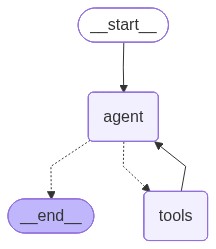
Here we use the lang-graph framework. The document base becomes a tool of our agent. The method create_react_agent creates a Langchain graph which encodes what we scripted before.
@tool
def search_hpc_wiki(query:str) -> str:
    """Retrieves relevant information from Cineca's HPC internal wiki in response to a natural language query, returning the results as a plain text string.

    Arguments:
        - query: a string with the user query.

    Returns:
        str: a string with the retrieved context.
    """
    return hpc_retriever.retrieve(query)

@tool
def search_linux_wiki(query:str) -> str:
    """Returns general trivia from the internal Linux documentation wiki in response to a natural language query, returning the results as a plain text string.

    Arguments:
        - query: a string with the user query.

    Returns:
        str: a string with the retrieved context.
    """
    return linux_retriever.retrieve(query)

@tool
def search_slurm_wiki(query:str) -> str:
    """Retrieves general trivia from the internal Slurm documentation wiki in response to a natural language query, returning the results as a plain text string.

    Arguments:
        - query: a string with the user query.

    Returns:
        str: a string with the retrieved context.
    """
    return slurm_retriever.retrieve(query)

langchain_tools = [search_hpc_wiki, search_linux_wiki, search_slurm_wiki]
agent = create_react_agent(llm, langchain_tools)
mm(agent.get_graph().draw_mermaid())
for query in query_set:

    response = agent.invoke({"messages": [query]})

    for message in response["messages"]:
        message.pretty_print()
    print("================================================================================")
================================ Human Message =================================
Tell me something about Linux
================================== Ai Message ==================================
Tool Calls:
search_linux_wiki (QaPWBAFPA)
Call ID: QaPWBAFPA
Args:
query: Linux
================================= Tool Message =================================
Name: search_linux_wiki
[RETRIEVED_RESOURCES]:
[DOCUMENT_CONTENT]: Linux Distributions: Learn about different Linux distributions (distros) such as Ubuntu, CentOS, Debian, Fedora, and Arch, which package the Linux kernel with user-space utilities and package managers for different use cases.
================================== Ai Message ==================================
Linux is an open-source operating system kernel that was first released on September 17, 1991, by Linus Torvalds. It has since grown to become one of the most widely used and influential operating systems in the world. Linux is known for its stability, security, and flexibility, making it a popular choice for servers, desktops, and embedded systems.
There are many different Linux distributions, often referred to as "distros," each tailored to specific use cases and user preferences. Some of the most popular Linux distributions include:
1. **Ubuntu**: Known for its user-friendly interface and extensive community support, Ubuntu is a great choice for both beginners and experienced users. It is based on Debian and is widely used on desktops and servers.
2. **CentOS**: CentOS is a community-supported distribution derived from sources freely provided to the public by Red Hat Enterprise Linux (RHEL). It is popular for server deployments due to its stability and long-term support.
3. **Debian**: One of the oldest and most respected Linux distributions, Debian is known for its strict adherence to free software principles and its extensive repository of software packages.
4. **Fedora**: Sponsored by Red Hat, Fedora is a cutting-edge distribution that often includes the latest software and technologies. It serves as a testing ground for features that may eventually make their way into RHEL.
5. **Arch Linux**: Arch Linux is a lightweight and flexible Linux distribution that tries to Keep It Simple. It is designed for users who want to have complete control over their system and is known for its rolling release model, which provides continuous updates.
Each of these distributions packages the Linux kernel with a set of user-space utilities and a package manager, allowing users to install, update, and manage software easily. The choice of distribution often depends on the user's specific needs, such as ease of use, stability, or access to the latest features.
================================================================================
================================ Human Message =================================
Tell me something about Slurm
================================== Ai Message ==================================
Tool Calls:
search_slurm_wiki (jSarb5swA)
Call ID: jSarb5swA
Args:
query: What is Slurm?
================================= Tool Message =================================
Name: search_slurm_wiki
[RETRIEVED_RESOURCES]:
[DOCUMENT_CONTENT]: Security and Policies in SLURM: Managing user authentication, permission controls, node isolation, job sandboxing, enforcing resource limits, and setting job timeout policies within a SLURM-managed HPC cluster.
================================== Ai Message ==================================
Slurm (Simple Linux Utility for Resource Management) is an open-source workload manager designed for Linux clusters. It is widely used in high-performance computing (HPC) environments to manage and allocate resources efficiently. Slurm provides a framework for managing jobs, nodes, and workloads, ensuring that computational resources are used optimally.
Key features of Slurm include:
1. **Job Scheduling**: Slurm schedules jobs based on resource availability and priority, ensuring that jobs are executed in an efficient manner.
2. **Resource Management**: It manages the allocation of computational resources, including CPUs, GPUs, and memory, across the cluster.
3. **Workload Distribution**: Slurm distributes workloads across the cluster nodes, balancing the load to maximize performance.
4. **Monitoring and Accounting**: It provides tools for monitoring the status of jobs and nodes, as well as accounting for resource usage.
5. **Security and Policies**: Slurm includes features for managing user authentication, permission controls, node isolation, job sandboxing, enforcing resource limits, and setting job timeout policies within a SLURM-managed HPC cluster.
Slurm is highly configurable and can be tailored to meet the specific needs of different HPC environments, making it a popular choice for research institutions, universities, and enterprises that require robust and scalable computing solutions.
================================================================================
================================ Human Message =================================
What's the weather like in Italy?
================================== Ai Message ==================================
I'm sorry, but I don't have the capability to provide real-time information like weather updates. However, you can easily find this information by checking a weather website or application.
================================================================================
================================ Human Message =================================
What are the names of the QOS queues available on the Leonardo supercomputer BOOSTER partition?
================================== Ai Message ==================================
Tool Calls:
search_hpc_wiki (rbruFCqff)
Call ID: rbruFCqff
Args:
query: QOS queues available on the Leonardo supercomputer BOOSTER partition
================================= Tool Message =================================
Name: search_hpc_wiki
[RETRIEVED_RESOURCES]:
[DOCUMENT_TITLE]: leonardo.rst.txt
[DOCUMENT_CONTENT]: .. tab-item:: Booster
+----------------+--------------------+-------------------------+--------------+---------------------------------+--------------+-------------------------------------+
| **Partition** | **QOS** | **#Cores/#GPU per job** | **Walltime** | **Max Nodes/cores/GPUs/user** | **Priority** | **Notes** |
+================+====================+=========================+==============+=================================+==============+=====================================+
| lrd_all_serial | normal | 4 cores | 04:00:00 | 1 node / 4 cores | 40 | No GPUs
[DOCUMENT_TITLE]: leonardo.rst.txt
[DOCUMENT_CONTENT]: .. note::
The partitions: **boost_fua_dbg, boost_fua_prod** can be exclusively used by Eurofusion users. For more information see the dedicated :ref:`specific_users/specific_users:Eurofusion` section.
[DOCUMENT_TITLE]: leonardo.rst.txt
[DOCUMENT_CONTENT]: , Hyperthreading x 2 |
| | | | | | | |
| (**default**) | | (8 logical cores) | | (30800 MB RAM) | | **Budget Free** |
+----------------+--------------------+-------------------------+--------------+---------------------------------+--------------+-------------------------------------+
| boost_usr_prod | normal | 64 nodes | 24:00:00 | | 40 | |
+ +--------------------+-------------------------+--------------+---------------------------------+--------------+-------------------------------------+
| | boost_qos_dbg | 2 nodes | 00:30:00 | 2 nodes / 64 cores / 8 GPUs | 80 | |
+ +--------------------+-------------------------+--------------+---------------------------------+--------------+-------------------------------------+
| | boost_qos_bprod | min = 65 nodes | 24:00:00 | 256 nodes | 60 | |
| | | | | | | |
| | | max = 256 nodes | | | | |
+ +--------------------+-------------------------+--------------+---------------------------------+--------------+-------------------------------------+
| | boost_qos_lprod | 3 nodes | 4-00:00:00 | 3 nodes / 12 GPUs | 40 | |
+----------------+--------------------+-------------------------+--------------+---------------------------------+--------------+-------------------------------------+
| boost_fua_dbg | normal | 2 nodes | 00:10:00 | 2 nodes / 64 cores / 8 GPUs | 40 | Runs on 2 nodes |
+----------------+--------------------+-------------------------+--------------+---------------------------------+--------------+-------------------------------------+
| boost_fua_prod | normal | 16 nodes | 24:00:00 | 4 running jobs per user account | 40 | |
| | | | | | | |
| | | | | 32 nodes / 3584 cores | | |
+ +--------------------+-------------------------+--------------+---------------------------------+--------------+-------------------------------------+
| | boost_qos_fuabprod | min = 17 nodes | 24:00:00 | 32 nodes / 3584 cores | 60 | Runs on 49 nodes |
| | | | | | | |
| | | max = 32 nodes | | | | Min is 17 FULL nodes |
+ +--------------------+-------------------------+--------------+---------------------------------+--------------+-------------------------------------+
| | qos_fualowprio | 16 nodes | 08:00:00 | | 0 | |
+----------------+--------------------+-------------------------+--------------+---------------------------------+--------------+-------------------------------------+
================================== Ai Message ==================================
The QOS queues available on the Leonardo supercomputer BOOSTER partition are:
- normal
- boost_qos_dbg
- boost_qos_bprod
- boost_qos_lprod
- boost_qos_fuabprod
- qos_fualowprio
================================================================================
================================ Human Message =================================
What is the scheduler used on leonardo? slurm or pbs?
================================== Ai Message ==================================
Tool Calls:
search_hpc_wiki (BIemP3LGZ)
Call ID: BIemP3LGZ
Args:
query: scheduler used on leonardo
================================= Tool Message =================================
Name: search_hpc_wiki
[RETRIEVED_RESOURCES]:
[DOCUMENT_TITLE]: leonardo.rst.txt
[DOCUMENT_CONTENT]: .. _leonardo_card:
Leonardo
========
Leonardo is the *pre-exascale* Tier-0 supercomputer of the EuroHPC Joint Undertaking (JU), hosted by **CINECA** and currently located at the Bologna DAMA-Technopole in Italy.
This guide provides specific information about the **Leonardo** cluster, including details that differ from the general behavior described in the broader HPC Clusters section.
.. |ico2| image:: img/leonardo_logo.png
:height: 55px
:class: no-scaled-link
Access to the System
--------------------
The machine is reachable via ``ssh`` (secure Shell) protocol at hostname point: **login.leonardo.cineca.it**.
The connection is established, automatically, to one of the available login nodes. It is possible to connect to **Leonardo** using one the specific login hostname points:
* login01-ext.leonardo.cineca.it
* login02-ext.leonardo.cineca.it
* login05-ext.leonardo.cineca.it
* login07-ext.leonardo.cineca.it
.. warning::
**The mandatory access to Leonardo si the two-factor authetication (2FA)**. Get more information at section :ref:`general/access:Access to the Systems`.
System Architecture
-------------------
The cluster, supplied by EVIDEN ATOS, is based on two new specifically-designed compute blades, which are available throught two distinc Slurm partitios on the Cluster:
* X2135 **GPU** blade based on NVIDIA Ampere A100-64 accelerators - **Booster** partition.
* X2140 **CPU**-only blade based on Intel Sapphire Rapids processors - **Data Centric General Purpose (DCGP)** partition.
The overall system architecture uses NVIDIA Mellanox InfiniBand High Data Rate (HDR) connectivity, with smart in-network computing acceleration engines that enable extremely low latency and high data throughput to provide the highest AI and HPC application performance and scalability.
The **Booster** partition entered pre-production in May 2023 and moved to **full production in July 2023**.
The **DCGP** partition followed, starting pre-production in January 2024 and reaching **full production in February 2024**.
Hardware Details
^^^^^^^^^^^^^^^^
.. tab-set::
.. tab-item:: Booster
[DOCUMENT_TITLE]: hpc_intro.rst.txt
[DOCUMENT_CONTENT]: .. dropdown:: Example
:animate: fade-in-slide-down
:chevron: down-up
A user requests 1 node, 4 CPUs, 4 GPUs, and 3 hours of walltime on the Booster partition of Leonardo. However, the job runs for only 2 hours.
From this information, we have:
* T = 2 h (elapsed time)
* N = 1 node
* C = 32 CPUs (number of CPUs available on a Leonardo Booster compute node â see :ref:`hpc/leonardo:Hardware Details`)
and, since:
.. math::
\frac{\text{Allocated}(\text{CPU})}{\text{Total}(\text{CPU})} = \frac{4}{32} = 0.125
.. math::
\frac{\text{Allocated}(\text{GPU})}{\text{Total}(\text{GPU})} = \frac{4}{4} = 1.0
the maximum of the resources requested per node is determined by the GPUs, therefore *R* = 1.0, and the billed hours are then calculated as:
.. math::
B_{H} = T \cdot N \cdot R \cdot C = 2 \cdot 1 \cdot 1.0 \cdot 32 = 64 \text{CPUh}
This means the job consumes 64 effective CPU hours from the project's budget.
----
.. note::
* The **serial partition** is available for limited post-production data analysis and can be used even after a Project Account has expired. Usage of this partition is excluded from STDH billing (**free of charge**).
* By default, the amount of memory allocated per node is proportional to the number of CPUs requested.
* When nodes are requested in **exclusive mode** (see :ref:`hpc/hpc_scheduler:Scheduler and Job Submission` section), the entire node is reserved for the job, regardless of the specific resources requested. In such cases, the allocated resources may exceed the explicitly requested ones.
* The **resources per node** are listed in the **Hardware Details** section for each cluster. Refer to the :ref:`hpc/hpc_clusters:Cluster Specifics` section for the complete list of Cineca's HPC systems.
Budget Linearization
^^^^^^^^^^^^^^^^^^^^
A linearization policy governs the priority of scheduled jobs across Cineca clusters. To each Project Account is assigned a monthly quota (MQ) calculated as:
.. math::
MQ = TB/NM
TB = total assigned budget
NM = total number of months
Beginning on the first day of each month, any User Accounts belonging a Project Account may utilize their quota at full priority.
As the budget is consumed, submitted jobs progressively lose priority until the monthly quota is exhausted.
Subsequently, these jobs are still considered for execution but with reduced priority compared to accounts with remaining quota.
This policy aligns with practices at other prominent HPC centers globally, aiming to enhance response times by aligning CPU hour usage with budget sizes.
[DOCUMENT_TITLE]: leonardo.rst.txt
[DOCUMENT_CONTENT]: .. tab-item:: Booster
+----------------+--------------------+-------------------------+--------------+---------------------------------+--------------+-------------------------------------+
| **Partition** | **QOS** | **#Cores/#GPU per job** | **Walltime** | **Max Nodes/cores/GPUs/user** | **Priority** | **Notes** |
+================+====================+=========================+==============+=================================+==============+=====================================+
| lrd_all_serial | normal | 4 cores | 04:00:00 | 1 node / 4 cores | 40 | No GPUs
================================== Ai Message ==================================
The scheduler used on Leonardo is **Slurm**.
================================================================================
Next steps
In this tutorial, we have seen how a RAG system can be implemented using semantic search and how multiple document bases can be integrated into a workflow and agentic setups.
Although this tutorial was very introductory, I hope it helps you on your GenAI journey. If you want to take your knowledge to the next level, here are some additional topics you might want to explore:
Hypothetical document embeddings and hypothetical questions (a powerful technique to improve retrieval results);
Memory management in agents;