Onboarding
Once you are granted access, and at the time of writing, onboarding takes a separate process for each device you applied for. Yet as mentioned in the access page, there is one application and one portal. The diagram below shows the onboarding process so far for three of the devices.
Note
These steps may change going forward, as the hosting sites update their procedures. Check each site’s official documentation for the current process. Keep an eye on my-eurohpc.eu for updates on access methods, and follow ENCCS on LinkedIn for further updates.
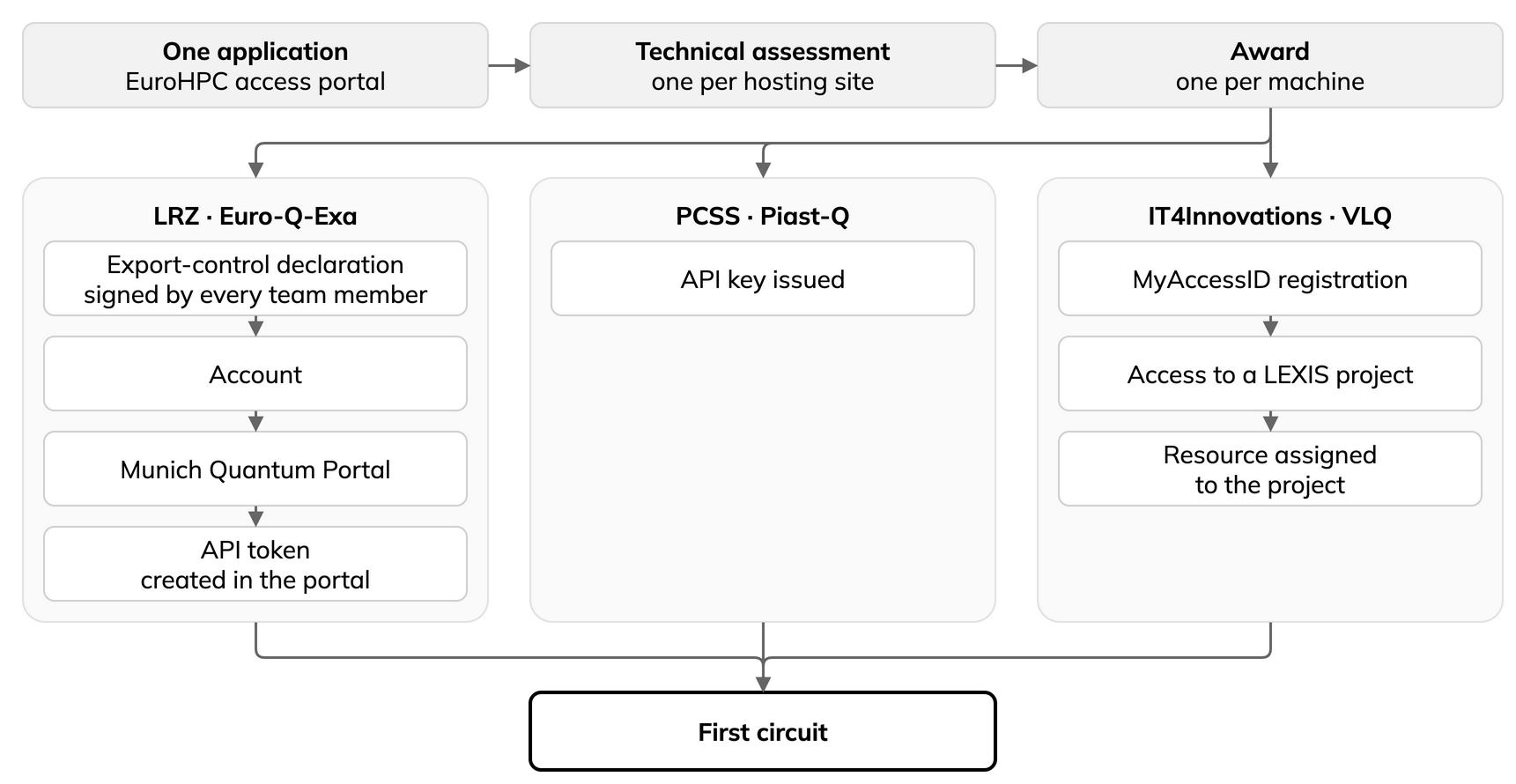
One application, then an award and a separate onboarding for every machine.
Details per site/machine
LRZ, Euro-Q-Exa. A signed export-control declaration goes back to the site, after which you receive an account and can log into the Munich Quantum Portal. You then create an API token in the portal yourself.
Two things to watch at LRZ. First, the export-control declaration is signed and returned by every team member named on the proposal, not just the applicant, so each of them has to be prompted. Second, check your account’s expiry date against your allocation period.
To manage your LRZ account and password, open: LRZ: IDM-Portal 2
To log in, open: LRZ: Munich Quantum Portal
For the HPC-QC use case, open: LRZ: HPCQC System Access and HPCQC Job Submission via MQSS-Adapter
To contact LRZ’s quantum team, open: LRZ: User Support and Request Mechanisms
IT4Innovations, VLQ. You register with MyAccessID, then request access to a named project in the LEXIS platform, and the site assigns a resource to that project. Submission then goes through HEAppE, which is a job-submission middleware. Keep three identifiers apart: your LEXIS project short name, the resource name, and the project as the submission middleware knows it.
To follow the site’s access steps, open: IT4Innovations: VLQ, Access
To log in to LEXIS, open: LEXIS Platform: portal
To read how to log in to LEXIS, open: LEXIS Platform: LEXIS Platform Login
To contact IT4Innovations support, open: IT4Innovations: Help and Support
PCSS, Piast-Q. The simplest to onboard of the three: you are issued an API key and you use it. So far, no account, no portal and no forms are needed for direct submission. The hybrid route, which couples to classical resources at the same site, additionally needs an institution account and a VPN certificate.
To contact PCSS, open: PCSS: Contact details