Leonardo setup: A100 single-GPU route
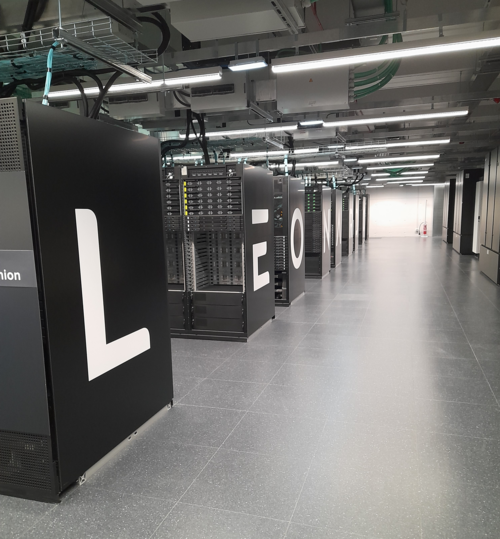
Leonardo supercomputer. Photo: National Institute of Geophysics and Volcanology (INGV); source and license details (CC BY 4.0). This copy was resized; the photo does not imply institutional endorsement.

Note
Leonardo hardware The Leonardo Booster uses x86_64 CPU nodes with four NVIDIA A100 GPUs, each with 64 GiB of memory.
Do not reuse an Arrhenius GH200/aarch64 executable or SIF. The bounded Leonardo qualification ran the same lesson silicon examples on one A100: one and eight native ALCHEMI trajectories, and one LAMMPS ML-IAP/Kokkos trajectory. Each was a five-step NVE smoke, not a speed comparison or scientific-equivalence result. The existing LAMMPS build has MPI disabled, so the lesson’s coupled multi-GPU LAMMPS scaling commands are not qualified on Leonardo.
These jobs used the boost_usr_prod partition and boost_qos_dbg for short
qualification. Check current account, queue limits, modules and GPU policy.
The tested module family is:
module load profile/base
module load gcc/12.2.0 cuda/12.2 openmpi/4.1.6--gcc--12.2.0-cuda-12.2
Place the lesson checkout, native Python environment, model checkpoint,
LAMMPS build, and private results directory under your project allocation,
not in one shared Git repository. The pinned original checkpoint has SHA-256
2ddb079cee0e131eaaf6912ba581b394551ead283e95c99cfe78c605d10b5736.
Set paths in the submitting shell; the scripts refuse missing inputs:
export MLIP_LESSON_ROOT=/leonardo_scratch/fast/<PROJECT>/<USER>/mlip-hands-on
export MLIP_LEONARDO_PYTHON=/path/to/private/python/bin/python3
export MLIP_MODEL=/path/to/private/mace-mp-0a-small.model
export MLIP_RESULTS_DIR=/path/to/private/results
export MLIP_REPLICAS=1
sbatch --account=<PROJECT> \
  --export=ALL,MLIP_LESSON_ROOT,MLIP_LEONARDO_PYTHON,MLIP_MODEL,MLIP_RESULTS_DIR,MLIP_REPLICAS \
  scripts/test-leonardo-alchemi.sbatch
After a definite result, set MLIP_REPLICAS=8 for a distinct batched
smoke. Do not replay an uncertain submission. The scripts use the one-GPU
srun step rather than assuming the batch shell’s GPU visibility.
LAMMPS ML-IAP/Kokkos
Use a native CUDA-Kokkos LAMMPS build with the ML-IAP, KOKKOS, and
PYTHON packages enabled, a matching Python wrapper from the same pinned
source tree, and a CuPy overlay compatible with its ML-IAP bridge. A
successful import lammps alone is not enough. The tested build used LAMMPS
stable_22Jul2025_update6, Python 3.12.14, CUDA 12.2 toolchain, MACE 0.3.15,
PyTorch 2.13.0+cu126, and CuPy 14.2.0. Its ML-IAP export has SHA-256
db578c556298ad3bb1f4a93faa50d540eb2b9792215e81ef7548dd7e20a746e8.
The existing build is not a Leonardo MPI solution.
If the pinned LAMMPS source archive is available, its Python wrapper is the
python/lammps/ package. Preserve that whole directory, including
lammps/mliap/__init__.py; mliap is a package, not mliap.py. The tested
native runtime also needs CuPy from the build overlay on PYTHONPATH.
Keep the wrapper and overlay outside Git and verify their archive identities
before extraction. Set the resulting paths:
export MLIP_LEONARDO_LAMMPS_PREFIX=/path/to/native/lammps-prefix
export MLIP_LEONARDO_WRAPPER_ROOT=/path/to/pinned/source/python
export MLIP_LEONARDO_OVERLAY_ROOT=/path/to/pinned/cupy-overlay
export MLIP_MLIAP_MODEL=/path/to/private/mace-mliap-db578c55.pt
sbatch --account=<PROJECT> \
  --export=ALL,MLIP_LESSON_ROOT,MLIP_LEONARDO_PYTHON,MLIP_LEONARDO_LAMMPS_PREFIX,MLIP_LEONARDO_WRAPPER_ROOT,MLIP_LEONARDO_OVERLAY_ROOT,MLIP_MLIAP_MODEL,MLIP_RESULTS_DIR \
  scripts/test-leonardo-lammps.sbatch
The successful Leonardo smoke included the matching CuPy overlay; an earlier
distinct smoke without it failed at run 0 with NameError: cupy. Neither
that failure nor the successful one-GPU smoke proves a multi-GPU MPI build.
The lesson’s published HTML can be viewed without a GPU allocation. To run
the .md pages as notebooks on Leonardo, install the private Jupytext and
MyST renderer environment described in Arrhenius (see
Opening the notebook for the token and TLS handling) and keep the server token, TLS key, and job logs private. A Leonardo notebook
server itself has not yet been site-qualified.